Announcements

When:
November 1, 2024

Hours of operation for Food Services effective November 4, 2025.

Visit dineoncampus.ca for menu and hours of operation.
North Campus Monday to Thursday Friday Saturday Sunday
Food Emporium 9 a.m. - 5 p.m. 9 a.m. - 3 p.m. Closed Closed
Tim Horton's 7:30 a.m. - 7:30 p.m. 7:30 a.m. - 6 p.m. Closed Closed
Starbucks LRC 7 a.m. - 3:30 p.m. 7 a.m. - 3 p.m. Closed Closed
Starbucks Town Hall 8 a.m. - 6 p.m. 8 a.m. - 6 p.m. Closed Closed
Street Café 7 a.m. - 8 p.m.  7 a.m. - 5 p.m. 8 a.m. - 3 p.m. 8 a.m. - 3 p.m.
Subway 10 a.m. - 6 p.m. 10 a.m. -  4 p.m. Closed Closed
Booster Juice 9 a.m. - 4 p.m. 9 a.m. - 3 p.m. Closed

Closed

Staff Lounge 9 a.m. - 2 p.m. 9 a.m. - 2 p.m. Closed Closed
GH Café 7:30 a.m. - 4 p.m. 7:30 a.m. - 3 p.m. Closed Closed
Trades Café 7 a.m. - 5 p.m. 7 a.m. - 3 p.m. Closed Closed
Villa Madina 11 a.m. - 4 p.m. 11 a.m. - 3 p.m. Closed Closed
Hawk's Nest 7:30 a.m. - 5 p.m. 7:30 a.m. - 3 p.m. Closed Closed
Residence 7:30 a.m. - 11 p.m. 7:30 a.m. - 10 p.m. 9 a.m. - 10 p.m. 9 a.m. - 11 p.m.
The Spot Closed  Closed  Closed Closed
LinX Lounge 10 a.m. - 7 p.m. 10 a.m. - 7 p.m. Closed Closed
Bento Sushi  10 a.m. - 6 p.m. 10 a.m. - 6 p.m. Closed C.losed
Ackee Tree/Spiked Patties  10 a.m. - 6 p.m. 10 a.m. - 6 p.m. Closed Closed
Lakeshore Campus Monday - Thursday Friday  Saturday Sunday
Starbucks 7:30 a.m. - 4 p.m. 7:30 a.m. - 3 p.m. Closed Closed
Tim Horton's 7:30 a.m. - 5 p.m. 7:30 a.m. - 5 p.m. Closed Closed
OTG 10 a.m. - 8 p.m. 10 a.m. - 6 p.m. Closed

Closed

L Commons 8 a.m. - 4 p.m. 8 a.m. - 3 p.m. Closed Closed
Residence Cafeteria (4th floor) 7:30 a.m. - 11 p.m. 7:30 a.m. - 10 p.m. 9 a.m. - 10 p.m. 9 am - 11 pm
Cultural Hub Retail Cafeteria (4th floor)  9 a.m. - 3 p.m. 9 a.m. to 3 p.m. Closed Closed
Cultural Hub Street Café (1st floor) 7:30 a.m. - 4 p.m. 7:30 a.m. - 3 p.m. Closed Closed
F Cart Cafe  located in F building)  9 a.m. - 3 p.m.  9 a.m. - 2:30 p.m. Closed Closed
Arena Cafe (Burmingham)  9 a.m. - 3 p.m.  9 a.m. - 3 p.m.  Closed Closed
When:
November 1, 2024
Contact:
Leanne Henwood-Adam

Support programs at Cruisers Sports by donating gently used books for our charity sale.

Drop-off Location:

Leanne Henwood-Adam, Fitness Coordinator
North Campus, Athletics (by November 14)

Book Sale:

November 18 and 19
Outside Athletics, North Campus, Building A
10 a.m. – 3 p.m.

Thank you for helping make a difference.

When:
November 1, 2024
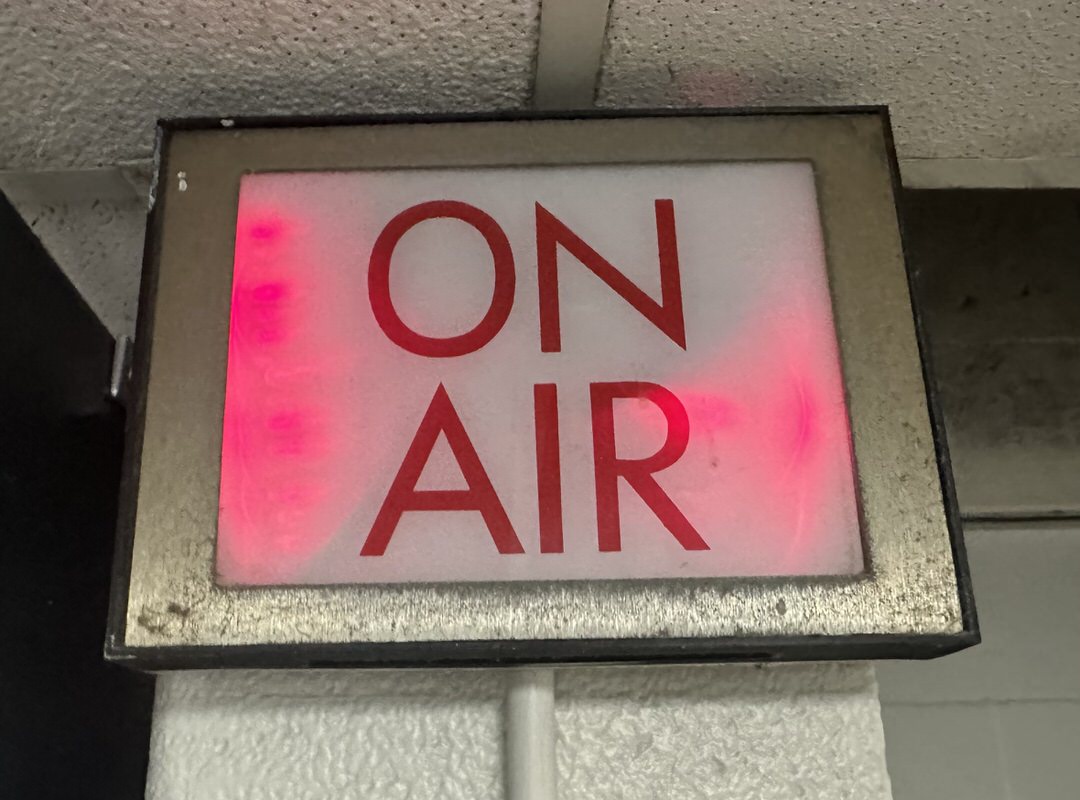
Radio Humber on-air sign

The United States goes to the polls on November 5, and Humber Polytechnic has you covered.

Our journalism and radio broadcasting students are teaming up with live coverage of the election on Radio Humber, 96.9 FM.

Join us starting at 8 p.m., with updates every 15 minutes. 

Plus, look for updates on our news website, Humber Et Cetera, throughout the night.

When:
November 1, 2024
Contact:
Sarah Armenia

At the Lakeshore Learning Commons (L1000), the Grab 'n Go Food Bank is a FLAS partnership with the Library, the Faculty Union (Local 562), the Support Staff Union (Local 563) & Advising and Career Services.

In November, the Grab 'n Go at the Lakeshore Learning Commons (L1000) will run every Tuesday. 

Please note the upcoming Tuesdays when food will be available:

  • Tuesday, November 5
  • Tuesday, November 12
  • Tuesday, November 19
  • Tuesday, November 26

How does the Food Bank work?

  1. Members of the Humber community who are experiencing food insecurity or hardship are encouraged to stop by the Lakeshore Learning Commons (L1000) between 10 a.m. and 6 p.m.
  2. There they will encounter a cart with a selection of non-perishable and perishable food items.
  3. Allergen-free foods are also available and stored in a separate boxes.
  4. They can take what they need. It's that easy!

Can I help?

The Grab 'n Go Food Bank at the Learning Commons (L1000) is a FLAS partnership with the Library, the Faculty Union (Local 562), the Support Staff Union (Local 563) & Advising and Career Services.

If you would like to contribute, food donations are always welcome and appreciated. All donations can be dropped off at the Learning Commons (L1000) or the Lakeshore's MED building, 3rd floor. 

Together, let's help fight food insecurity and ensure all members of our Humber community have access to food.

If you have questions, please contact Sarah Armenia at sarah.armenia@humber.ca.

When:
October 31, 2024

Here are the highlights of faculty questions from October. These are not necessarily the most frequently asked questions, but helpful for all faculty members to know!

Question: How do I enable SafeAssign for my Assessment?

Answer:

Remember to enable SafeAssign before students have access to your assessment!

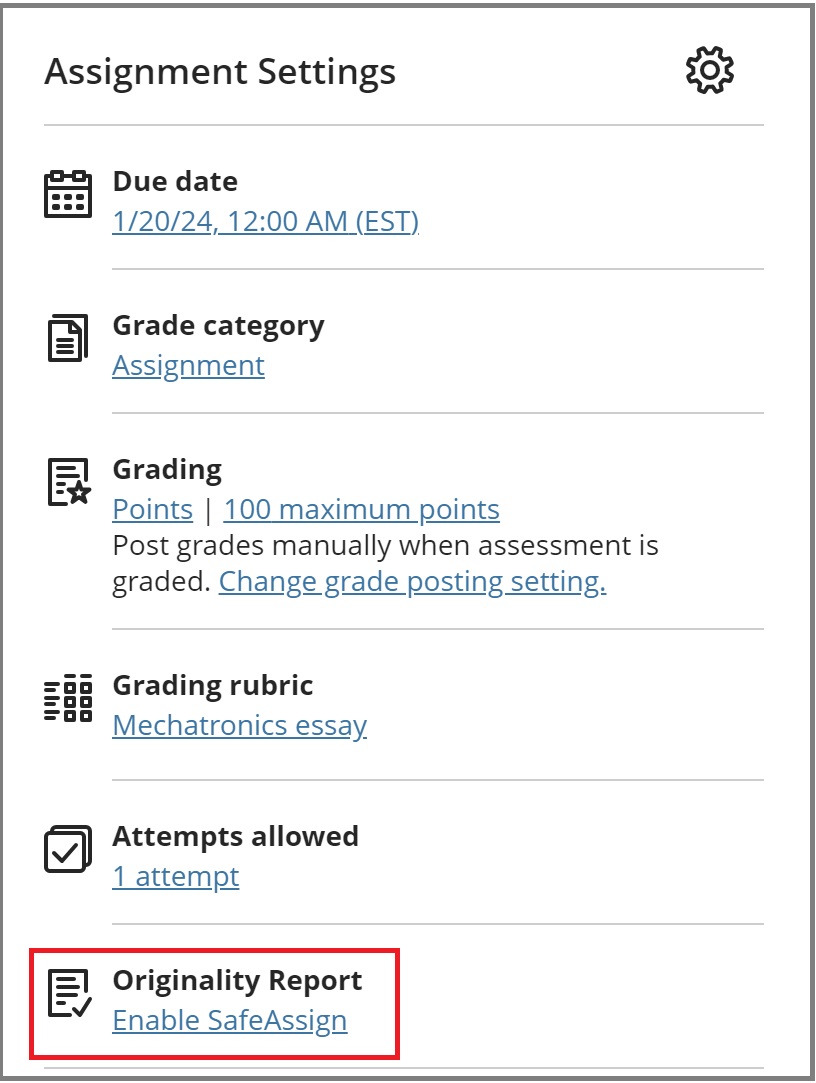
  1. Locate the test or assignment you want to enable SafeAssign for.
  2. Click Enable SafeAssign from the bottom of Assignment Settings panel on the right side of the editing view.
    Assignment Settings
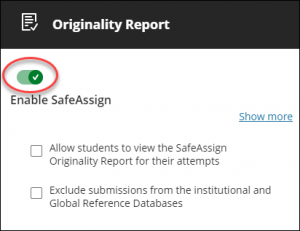
  3. Using the toggle switch, turn on SafeAssign.toggle
    • Allow students to view the SafeAssign Report for their attempts: Select this checkbox if you want your students to view the SafeAssign Report.
    • Exclude submissions from the institutional and Global Reference Databases: Select this checkbox if you want to exclude submissions.
  4. Select Save once you're done!

Learn more about SafeAssign at the Faculty Blackboard Help page.

Question: How do I grade my Midterms using the Gradebook in Blackboard?

Answer:

There are 3 main methods to use the Gradebook for your midterms is:

  • Method 1: Using the overall grade column as your midterm grade. This should only be used when you’ve already created all course assessments. To do this, please complete the following:
    • Set up the Overall Grade as a weighted total.
    • Ensure that you only grade items that contribute to the midterm grade.
    • The grade displayed is the midterm grade. You can enter that grade into Banner. As you continue to grade items throughout the semester, the Overall Grade will update to reflect the students' current grade.
  • Method 2: Creating a manual calculation column within Ultra to calculate midterm grades.
    • Learn how to add a manual grade column.
    • Choose either “Add Calculation” or “Add Total Calculation“. The Total Calculation column mirrors the Overall Grade column, enabling the easy calculation of the lowest/highest grades.
    • Once you name the column, you can set the calculation to add or multiply grades or set a value for the midterm, which you can learn more about online.
  • Method 3: Downloading a copy of the Gradebook into Excel and calculating the grades from there.

Question: How do I override or change the mark on an individual question in an assignment or test?

Answer:

  1. Access the test and the student’s submission you would like to grade.
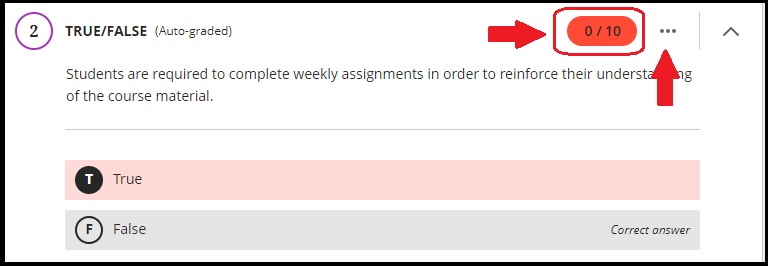
  2. Change the auto-graded score by directly editing the grade pill.
    Overriding a question grade

You can change the final grade on an assessment or the overall grade by following the instructions at this Faculty Blackboard Help page.

Question: What's the difference between an Accommodation, an Exception and an Exemption? How do I add an Exception?

Answer:

  • An Accommodation is course-wide and applies to due dates and time limits for all assessments in your course for a specific student.
  • An Exception applies to a specific assessment for a specific student, where you can change the visibility dates and number of attempts for that student. (If the student already has the Accommodation that covers the Exception you want to apply, you do not need to set it again.)
  • An Exemption applies to a specific student to be exempted from a specific assessment.

This is how you can add an exception in your course:

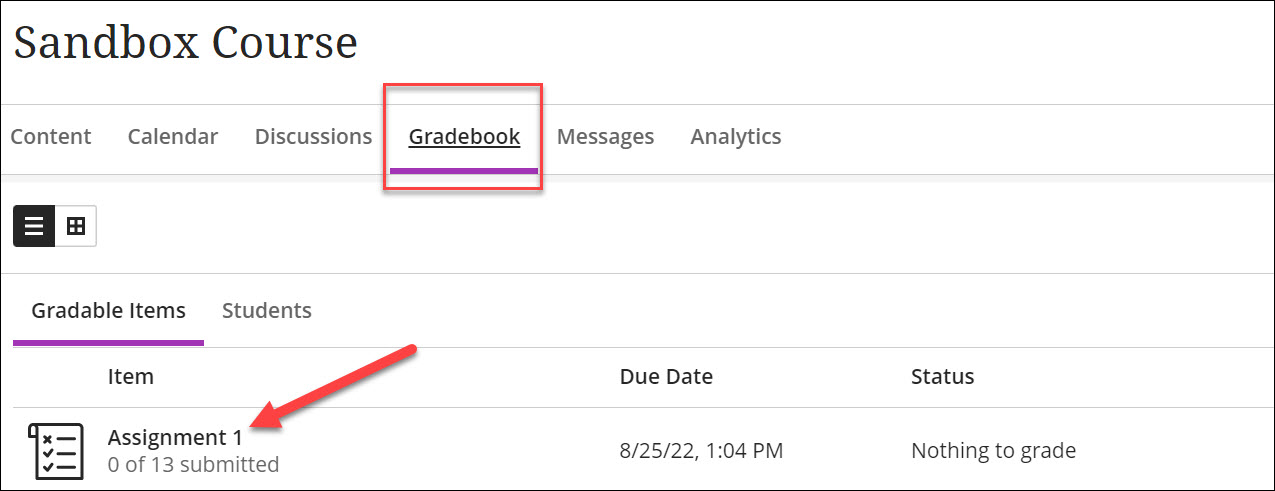
  1. Go to the Gradebook and select the assessment a student needs an exception in.
    Gradebook in the gradable items view.
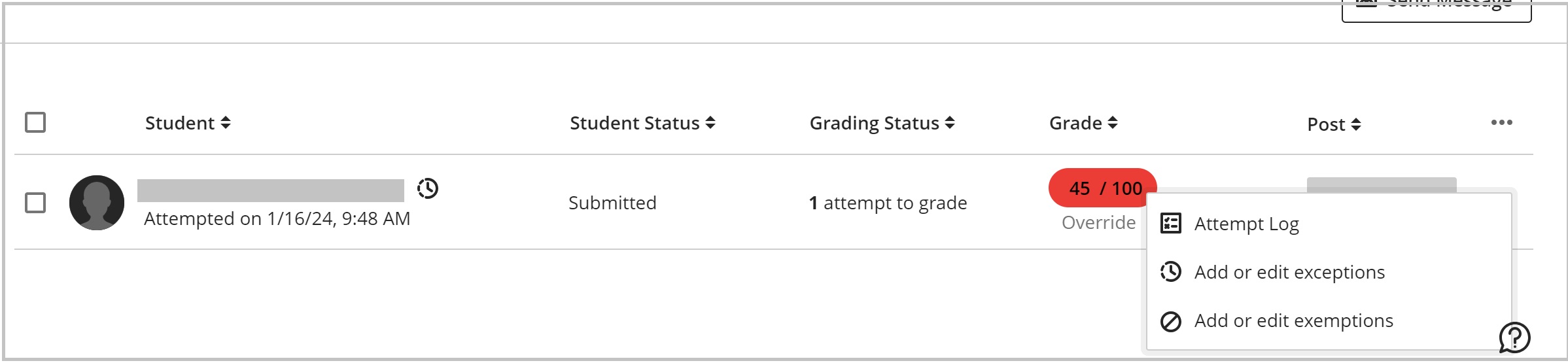
  2. Locate the student and select the three dots at the end of their row. Next, select “Add or edit exceptions”.
    Exception
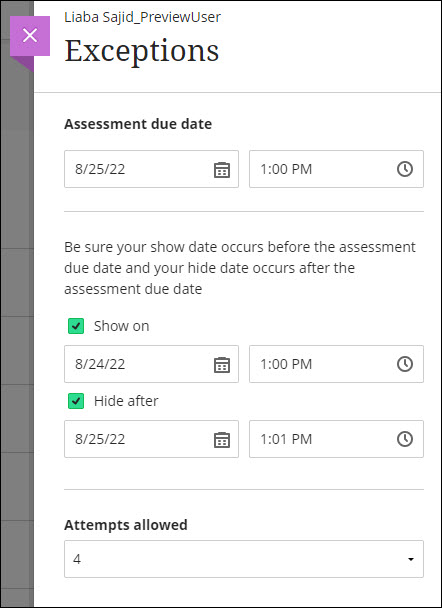
  3. A panel should open up. On this panel, you are able to adjust the due date for the student. You can also provide them an alternate window in which to write the assessment and/or extra attempts.
    Exceptions panel.
  4. Select Save. After an exception is added, an icon appears next to the student’s name.
    Icon indicating an Exception was given next to a students name.

Learn more about adding or removing exceptions and exemptions at Innovative Learning's Faculty Blackboard Help page.

Need support? The Innovative Learning Support Centre is here to help..

When:
October 30, 2024
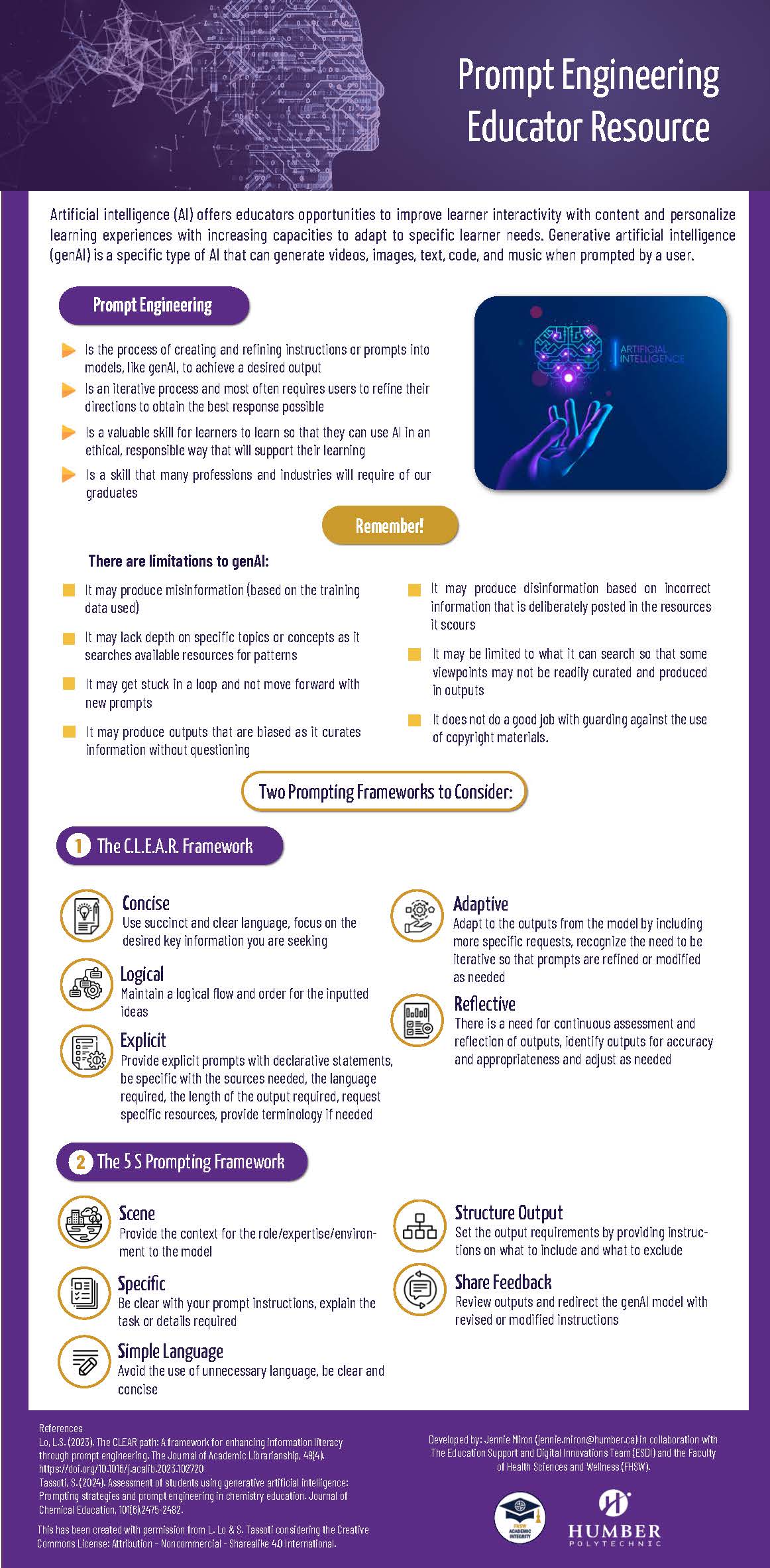
Info graphic

In Fall 2023, a faculty resource was developed under the Academic Plan Priority 3 Projects initiative to support our efforts in teaching students to conduct research and write with integrity in the digital age (Priority 3 Projects). This resource, the GenAI Module, remains available for faculty use (GenAI Faculty Module).

In addition, a supplementary resource was created to assist in teaching students how to effectively prompt generative AI (GenAI) tools to enhance their learning. An infographic detailing this process is included in this posting for faculty use and is attached with this posting.

If you have questions or would like more information regarding these resources, please contact Jennie Miron at jennie.miron@humber.ca.

When:
October 30, 2024
Contact:
Luana Fanelli

At the Conflict Resolution Centre (CRC), not only do we offer virtual and in-person appointments, we also have a team of excellent, trained interns who are experienced with conducting conflict management workshops! We have worked with many classes of students by providing tools to navigate group-work conflict.

Our workshops are interactive and customized. If you are interested in discussing options, dates and availability, please contact us at CRC@humber.ca.

Visit us at: https://business.humber.ca/conflictresolutioncentre

Follow us on Instagram: @humbercrc

Help Humber staff and students by promoting a resilient, healthy conflict resolution outlook.

When:
October 30, 2024
Contact:
Occupational Health and Safety Services

We currently have a vacancy for a faculty member, ideally from FSCS, on the Lakeshore Joint Occupational Health and Safety Committee (JOHSC). 

The Joint Occupational Health and Safety Committee is an advisory body that is made up of worker (Faculty and Support Staff) and management (Administration) members who work together to address and promote health and safety in the workplace.

Why should you become a JOHSC member?

  • Active Involvement: Contribute to the enhancement of safety across our campus community.
  • Networking and Engagement: Attend regular JOHSC meetings to foster collaboration.
  • Hands-On Experience: Participate in inspections of campus buildings and workplaces throughout the year.
  • Knowledge Enhancement: Engage in training opportunities and participate in walkthroughs of newly renovated areas.
  • Time Commitment: Worker members on the committee are allotted an average of two hours per week to conduct committee activities. There are five JOHSC meetings a year, and members will complete approximately three workplace inspections a year.  

If you are interested in becoming a member, please contact the faculty union at info@opseu562.org.

Otherwise, for more information about the JOHSC at your site, meeting dates, workplace inspection schedules, or the contact information of the committee members, visit: https://hrs.humber.ca/safety/joint-health-safety-committee/about.html

Lakeshore JOHSC

When:
October 30, 2024
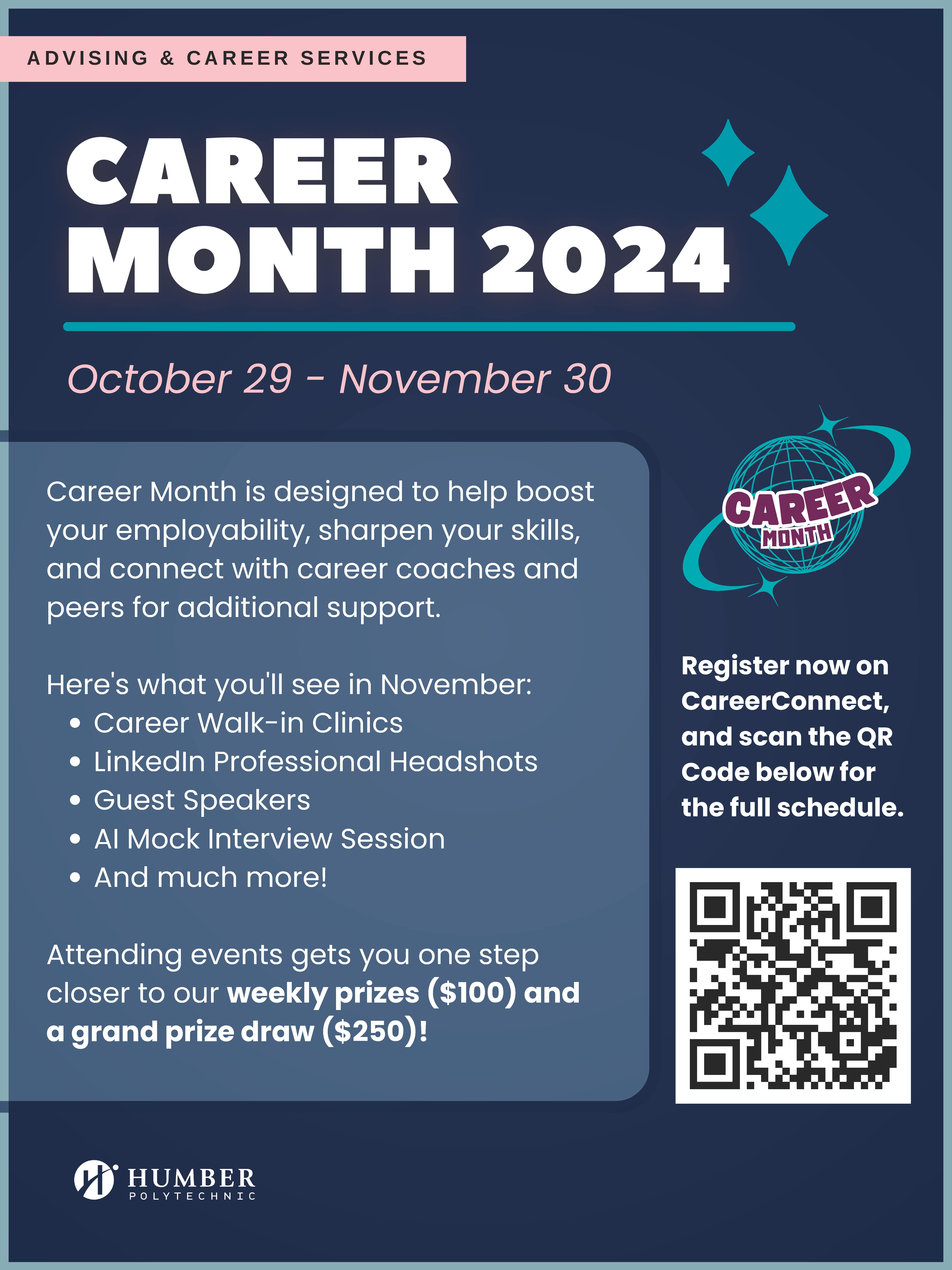
Text poster with QR code

Dear Faculty and Support Staff,

As part of Advising and Career Services’ ongoing efforts to support student employability skill development, we are excited to announce Career Month for November 2024. This month-long series of events is designed to provide students with valuable opportunities to enhance job search strategies, develop professional skills, and connect with peers and coaches.

We kindly ask for your support in promoting these events to your students. Your encouragement can make a significant difference in ensuring that our students take full advantage of the opportunities available to them.


Career Month is Here!

Advising and Career Services invites all Humber students to engage in our Career Month sessions, designed to enhance your career readiness.

This November, we're bringing you an event-packed month designed to supercharge your career! Whether you're looking to polish your resume, nail your next interview, or build new skills, Career Month has everything you need to step up your game.

Here’s what you can look forward to:

  • Career Walk-In Clinics: on-the-spot resume reviews, an opportunity to polish Elevator Pitches, and attend a Mock Career Fair to refine your networking skills.
  • Free LinkedIn Professional Headshots: Upgrade your online presence with a polished, professional photo that’ll leave a lasting impression.
  • Equity Deserving Panel in collaboration with Seneca Polytechnic: Join career conversations on Empowering Through Mentorship: Building Inclusive Networks.
  • Master the Art of Interviews: Feel like a pro in any interview situation with workshops that teach you how to impress hiring employers and land that job!
  • Job Search Hacks with Devant: Uncover the secrets to optimizing your job hunt using Devant's job search tools and resources.
  • AI Mock Interview Session: Hosted by Alumni Engagement, practice your interview skills with AI and get real-time feedback to improve your interviewing skills and much more.

And that’s not all. By attending events, you’ll get closer to winning weekly prizes of $100 and the grand prize of $250 in our Career Month draw.

Register now on CareerConnect and check out the full schedule on our Career Month webpage. Don’t wait - this is your chance to build connections, gain insights, and advance your career.

Keep an eye on our social media and follow @humbercareer for more updates.

Hosted by Advising & Career Services

When:
October 29, 2024
Contact:
Jennifer Reitano
Tel:
4398
A save the date flyer for the Eco Closet on November 21

The Fashion Arts and Business students are working on their annual Eco Closet and are looking for professional business attire clothing that can be given a second life.

Donation Boxes are available across campus until November 20 at:

  • LRC
  • Gratitude Hall
  • E-Concourse
  • Longo Faculty of Business
  • Office of Sustainability 
  • Fashion Institute (Lakeshore) 

Pages