Announcements

When:
October 16, 2024

Extension request guidelines are provided to students who are registered with Accessible Learning Services and require extensions as a disability-related accommodation. 

There may, on occasion, be exceptions to these guidelines for specific disability-related reasons (for example, when a disability-related reason prevented the student from engaging in the accommodation process). 

With increased efforts to embed accessibility in curriculum, applying the principles of Universal Design for Learning (UDL) can reduce the need for extension requests. These include breaking down large assignments into smaller components with respective due dates or implementing a “voucher” system allowing all students an opportunity or two to submit assignments late without penalty or rationale. 

It is understood that there is value in structure, timelines and building responsibility in our students, but peer review supports pedagogical value in compassion and suggests rethinking deadline and late penalty policies.  

Visit our ALS Information for Faculty website to learn more about extension accommodations. 

Please email us at accessible-learning@humber.ca with suggestions for key accessibility-related topics that you would like us to address through the Communiqué.

When:
October 15, 2024
Contact:
Alison Bambury
Posters/Attachments: Event Poster
QR code

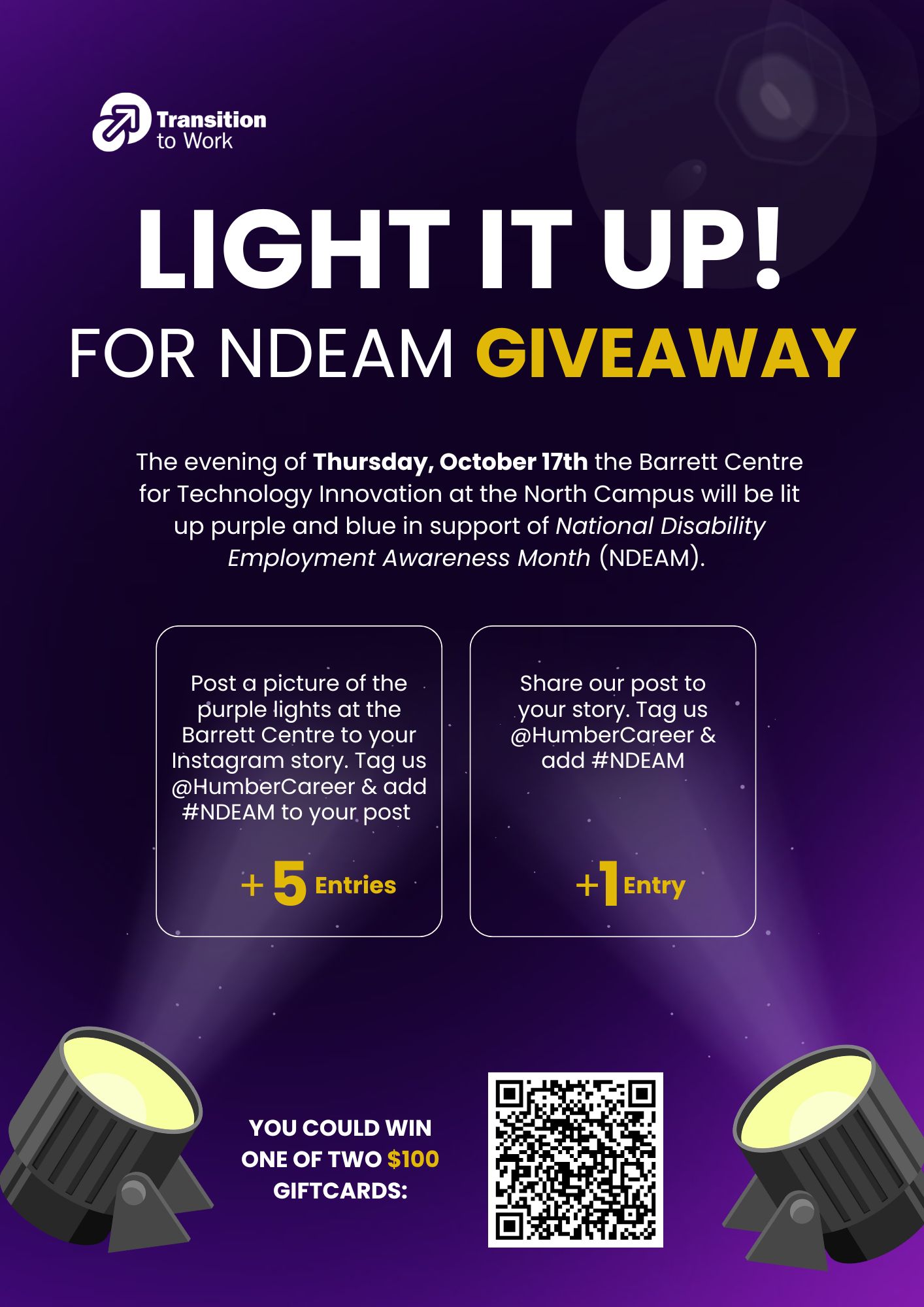
Light it Up! for NDEAM Photo Giveaway Contest-Transition To Work Program.

On the evening of Thursday, October 17 the Barrett Centre for Technology Innovation (Barrett CTI) at the North Campus will be lit up purple and blue in support of National Disability Employment Awareness Month (NDEAM).

Last year, over 600 organizations across the country were involved in this event including the Lakeshore Campus Welcome Centre.

This year, students can enter a draw to win one of two $100 prize cards by posting photos of the illuminated Barrett CTI on Instagram and tagging @HumberCareer with #NDEAM. 

The prize winner will be randomly selected and the winners will be announced on Monday, October 21 from the @HumberCareer Instagram account. 

To enter contest:

  • Get five entries - Post a picture of the purple lights at the Barrett CTI to your Instagram story. Tag us @HumberCareer and add #NDEAM to your post.
  • Get one entry - Share our post to your story. Tag us @HumberCereer and add #NDEAM.
When:
October 16, 2024
Contact:
Adam Weissengruber

Leganto is a tool for creating, sharing and maintaining course resources lists. It is supported by the Library and is available in the Blackboard Content Market. 

Faculty can build their own Leganto lists, or have the Library build them based on the requested content.

Meet Leganto (video)

Leganto course lists can include:

  • links to library article and eBook collections
  • streaming media
  • open educational resources (OERs) 
  • PDF files
  • websites

View this sample Leganto list to see the variety of materials they can include.

Key features and benefits of Leganto:

  • The ability to organize the list to match the design of your course (by week, topic, module, unit, etc.)
  • The ability to tag materials as required, supplemental, optional, etc.
  • A central location in a Blackboard course site for students to access all assigned readings, videos, etc.
  • Analytics that provide insight into the level of engagement students have with the resources.
  • Lists are easy to modify and can be reused in future semesters.
  • Tools to collaboratively annotate course materials.
  • Simplified communication with the Library to submit digitization requests and enquire about the availability of specific articles, books, etc.
  • Facilitates the evolution of courses from the single textbook model to courses with freely accessible materials drawn from a wide range of sources.

Want to learn more?

The Library’s Leganto team is available to provide an online demonstration and answer your questions via Teams. 

Complete the form below to book a demonstration or submit any questions you have about Leganto. 

Leganto Enquiry Form

When:
October 15, 2024
Two students smiling and sitting at a picnic table, having lunch.

We hope everyone had an enjoyable Thanksgiving weekend.

A big thank you to all the faculty and staff who have donated to support Humber’s Student Food Security Fund.

Your support means helping a student to buy meals on campus when they otherwise may not be able to afford it. It means giving them better access to food, so they have one less cost to worry about. It means giving them the renewed energy and focus to perform better on exams, avoid missing classes or in some cases withdrawing from school altogether. As you can see - it means a lot!

For those who would like to make a donation and have not yet had the chance - you can do so online.

Thank you for helping us keep the spirit of Thanksgiving alive!

Sincerely,

Wanda Buote and Alvina Cassiani
Humber Gives Co-Chairs

P.S. For more information about how you can support the Student Food Security Fund, contact Melissa in Advancement and Alumni by email at Melissa.beauchamp@humber.ca.

When:
October 15, 2024
Posters/Attachments: Event Poster
Humber Spa Fall Promotions

Spa Services & Retail Boutique Hours:

Monday, Wednesday & Friday: 9:15 a.m. to 5:45 p.m.
Tuesday & Thursday: 10 a.m. to 6:30 p.m.

The Humber Spa will be closed for the mid-semester break from October 21 to 25, 2024.

Appointments can be made in-person, email or phone  – walk-ins are welcome!

Tel: 416.675.5033 or thehumberspa@humber.ca.

Waxing promotion: Barely there! Available until November 1, 2024

  • 2 areas for 1 (lesser value at n/c)
  • Brazilian - $45.00

Retail Promotion: October 28 to November 10, 2024:

  • 15 per cent off skincare products; recommendation with treatment.
When:
October 15, 2024

Midterm season is around the corner! Here are five Gradebook Setup Tips from the team in Innovative Learning.

“How do I set up the overall grade in my course?”

Tip #1: Use the weighted grading calculation to show students the running total of their overall grade. Assign the weighted percentage values to each gradable item according to the assessment plan or structure of your published course outline. Complete this Overall Grade Calculation simulation to familiarize yourself with the process!

“How do I post Midterm Grades?”

Tip #2: Calculate and share midterm (and final) grades with your students using the overall grade column. Verify that all gradable items or categories have been assigned the correct weighted percentage values, and only those counting towards the midterm grade are included.

Tip #3: Check the box “Base calculation on points earned out of total graded points” so students see their actual grade earned to date. If left unchecked, the overall grade would factor in all other assessments not yet administered or graded, and therefore would show skewed student grades.

“Why can’t my students see their grades?”

Tip #4: On the content page, assessment item(s) and the content folder where they are located need to be made ‘visible to students’ so students can view their grade. When an assessment is hidden from students, it will not be visible to them in the Gradebook. Confirm the configuration of the release conditions to show course content to students during your specified time period.

“I copied a past course and now the Gradebook is assigning automatic zeros. What should I do?”

Tip #5: Gradebook assigns automatic zeros for past due assessments by default, even for past courses that have been copied. Disable automatic zeros from the gradebook settings to ensure that grades are not negatively impacted, and students are credited for all their work.

Need additional support? The Innovative Learning Support Centre is here to help!

When:
October 15, 2024
Contact:
Tiffany Duong

The Young Africa Works in Kenya TVET-18 Project has concluded!

To celebrate the project and its achievements, partners held a Legacy Forum.

TVET-18 is a partnership between Colleges and Institutes Canada and the Mastercard Foundation under the Young Africa Works Program. Humber Polytechnic led the three-year initiative focused on equipping youth with the skills and qualifications needed to operate in the Big Four Agenda (Food Security, Affordable Housing, Manufacturing, and Universal Healthcare) and Digital sectors, contributing to Kenya's Vision 2030 of transforming Kenya into a middle-income country.

The Legacy Forum brought together key stakeholders and project partners to engage in panels, discussions, and presentations about achievements participating Kenyan institutions made toward training, curriculum development, gender equality, enrollment, institutional and community outreach, and more.

IDI team members Juanita Perez, International Development Project Lead, Jorge Montoya, Manager of Business Operations, and Kent Schroeder, Senior Advisor, Research Evaluation and Learning, participated in the project's closure, providing guidance on the next steps and ensuring its legacy.

Read the closing article to learn more about the project's achievements and the participation of Humber faculty and staff.

When:
October 15, 2024
Contact:
Occupational Health and Safety Services

Celebrated annually each October, Global Ergonomics Month aims to promote and raise awareness of the field of ergonomics and its benefit in the workplace. Ergonomics is the science of fitting the task to the worker, with the goal of creating human-centred workplaces that reduce the risk of developing discomfort or injuries. Proper ergonomics in the workplace not only helps to improve health and safety for workers, but can also make job tasks more efficient by making work more ergonomic-friendly.

Occupational Health and Safety Services (OHS) is available to provide ergonomic assistance across Humber. For help in setting up your office workstation, please visit the Humber Office Ergonomics webpage. A variety of resources are available, including an Office Ergonomics training module, which can be accessed via LEARN on HRMS. Office ergonomic assessments can also be requested through OHS.

For more information regarding ergonomics at Humber, please visit the Humber Office Ergonomics webpage or email healthandsafety@humber.ca.

When:
October 15, 2024
Contact:
Ruchi Chauhan
askHumBee

Your 24/7 digital assistant for instant answers to all your HR questions, making your experience faster and easier than ever!

What is askHumBee?

A blue and yellow logo

Description automatically generated

askHumBee is an easy-to-use digital assistant for the Human Resource Management System (HRMS) to support employees and managers at Humber Polytechnic and the University of Guelph-Humber to find answers to common HR-related questions quickly. Powered by Oracle we have pre-programmed more than 2,000 queries, like policies, benefits, and how-to guides.

Get instant responses 24/7 when you askHumbee a question, making it a fast and convenient tool for all your HR needs.

How to Use askHumBee?

  1. Log in to the HRMS.
  2. Click the askHumBee icon at the bottom right corner. 
  3. Type your question such as “How do I book vacation time?” or “Where is my payslip?”
  4. askHumbee will respond or direct you to the appropriate learning resources.

What Can askHumBee Help You With?

  • Policy Info: Get quick answers to People & Culture policies.
  • Employee Benefits: Understand your health, pension, and other employee benefits information.
  • Time Off Requests: Learn how to apply for a leave, view your absence balances, and approve your employees’ absence requests.
  • HRMS Knowledge Base Links: Get directed to detailed and specific learning resources and/or forms.

Benefits of Using askHumBee

  • Available 24/7: Get answers to your questions any day and/or anytime.
  • Instant Responses: Get the information you need in seconds.
  • User-Friendly: Enter a subject or task like you would in a text message.
  • Saves Time: Access accurate information without needing to contact anyone.
  • Helps with HRMS tasks: Find out how to complete common HRMS tasks independently, like updating your contact details or accessing forms.

Why Use It?

We know your time is valuable and want to provide you with quick responses without waiting for an answer. Whether you are an employee or a manager, you can get quick, reliable help on anything HR-related on the HRMS, allowing you to focus on other tasks. Try it today and simplify your HR experience!

For more information, log in to the HRMS and askHumBee!

When:
October 15, 2024
Contact:
Elinor Bray-Collins

Map the System Returns to Humber for its sixth year – call for Faculty involvement

Map the System is back at Humber, and we are seeking faculty to participate in this unique educational opportunity.

What is Map the System?

Map the System is a global competition that encourages students from any discipline to explore the complexity of social and ecological issues. Unlike most social innovation competitions, which focus on pitching solutions, Map the System adopts a “learning-first” approach to driving social and environmental change.

What do students do?

Students use a critical, systems-thinking lens to explore the root causes, historical dynamics, and interconnections of a complex social or environmental issue they select themselves, or one shaped by faculty as part of a course.

We are seeking faculty participation:

We invite faculty from all disciplines to integrate Map the System (in whole or part) into their winter courses or electives. With support from the MTS Humber team, you’ll learn ways to enhance systems thinking in your classroom and provide students with the opportunity to see how their studies and interests connect to systems change. If you're interested in helping students better understand their role as changemakers in their future careers and lives, contact us.

To get involved, complete this short form.

Have other questions? Get in touch with the team: Elinor Bray-Collins at elinor.bray-collins@humber.ca; Sara Hassan at sara.hassan@humber.ca; Isabel Sousa at isabel.sousa@humber.ca.

Pages