Announcements

When:
December 4, 2025
Posters/Attachments: Event Poster
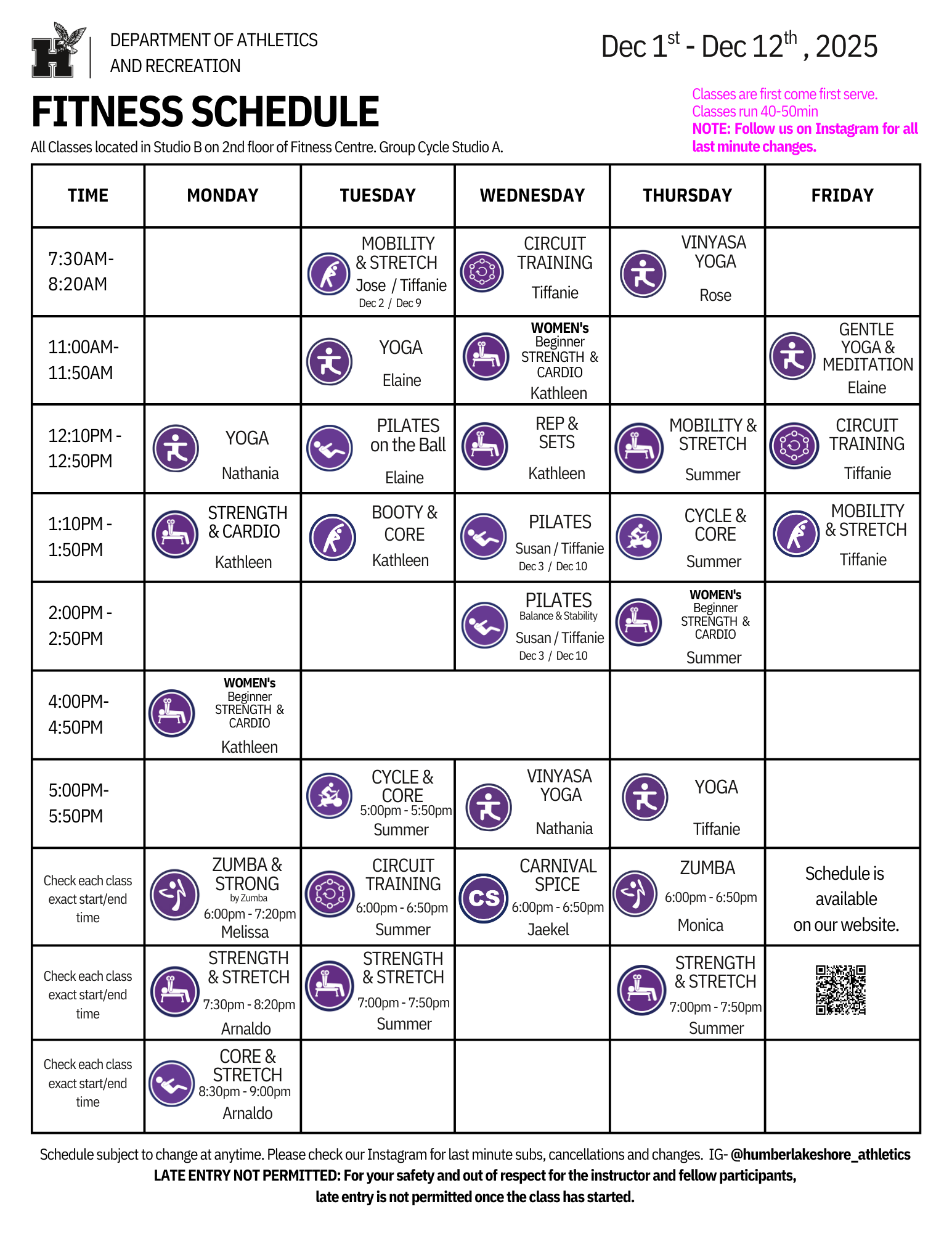
Fall Fitness Schedule

As we wrap up the Fall semester, we’re also heading into the final stretch of our Fitness Classes at the Humber Lakeshore Fitness Centre. Our last day of classes will be Thursday, December 12. If you’ve been meaning to jump in, now’s the perfect time to get a session in before the break!

Thank you to everyone who brought the energy all semester long. We loved seeing our community come together, move, and have fun.

Stay tuned for updates on our winter schedule in the new year.

When:
December 4, 2025

On Friday, December 5, flags at our campuses will be lowered to half-mast for 24 hours in memory of Anudeep Kaur who recently passed away. She was a student in the Business Administration program and was an important part of the Humber community.  

We are deeply saddened by her untimely death. We have been in contact with her family to express our condolences, and are providing support to faculty, staff and students who knew her.  

We recognize that tragic news can take an incredible toll on those who receive it. If you need support or are supporting someone and want to talk, please reach out to someone close to you, your Associate Dean, or EAP directly (1.844.880.9142), which will be available to both full and part-time employees impacted by this tragedy.   

If students are looking for support, here is a list of available support services: 

Mental Health Support 

  • Personal Counselling 
    • North Campus - SWAC – LRC 2nd Floor, call 416.675.5090 or email SWAC@humber.ca to request an appointment 
    • Lakeshore Campus – SWAC – WEL 2nd Floor, call 416.675.5090 or email SWAC@humber.ca to request an appointment 
  • On-campus walk-in support (CMHA Toronto), Monday to Friday, 5 p.m. to 10 p.m.: 
    • North Campus: LRC Building, 3rd Floor (by the Math & Writing Centre) 
    • Lakeshore Campus: L Building, 1st Floor (Room L1017) 
  • Togetherall: Free online peer-to-peer mental health support: Togetherall 
  • Crisis Helpline: call or text 9-8-8  
  • Community mental health support: 
  • Therapy in your community: Ontario Structured Psychotherapy (OSP) Program | CAMH 
When:
December 4, 2025
Contact:
Sarah Armenia

The Faculty of Liberal Arts & Sciences (FLAS) in partnership with the Faculty Union, Support Staff Union, and Career & Advising Services is having our second annual Holiday Food Drive for the Grab ‘n Go Food Banks at the North and Lakeshore campuses from November 17 to December 20.

Please consider collecting non-perishable food items in departments, at meetings, or at holiday parties to support the Grab ‘n Go Food Banks. Your continued support helps those in our Humber community experiencing food insecurity.

You may drop off food for the Holiday Food Drive for the Grab 'n Go Food Banks until December 20.

If your department would like to participate in the Holiday Food Drive in support of the Grab ‘n Go Food Banks, it’s easy:

  1. Contact candace.iron@humber.ca at North Campus or sarah.armenia@humber.ca or sarah.henderson@humber.ca at Lakeshore Campus for branded donation posters to affix to boxes.
  2. Ask people to donate non-perishable items for the Grab ‘n Go Food Banks. View the list of most needed non-perishable food items on the poster.
  3. Candace Iron, Sarah Henderson, and Sarah Armenia will arrange pick up of the boxes.
  4. If you want to consider supporting the Grab ‘n Go initiatives long term, such as supporting an additional day to run the Grab ‘n Go on campus, please reach out for more information. The Grab 'n Go Food Banks are a collective effort across campus to help our community.
When:
December 3, 2025
Contact:
Oeishi Bhattacharjee

Please be advised that the Student Wellness and Accessibility Centre (SWAC) will be closed on Friday, December 5, from 8:30 a.m. to 1 p.m. at both the Lakeshore and North sites. This closure is due to a staff professional development event.

Any pre-booked appointments during this time will be rescheduled, and we kindly ask learners to book appointments for Friday after 1 p.m.

We apologize for any inconvenience this may cause and thank you for your understanding as we continue to invest in staff development to better support our community.

If you would like to book an appointment with any of our SWAC services, please send an email to swac@humber.ca.

If you have an emergency, please call the Department of Public Safety at 416.675.6622 ext. 4000 or dial 911. 

Other Resources:

  • Good2Talk: Free and confidential counselling for postsecondary students 1.866.925.5454 or text GOOD2TALKON to 686868 
  • Information on support services across Ontario: 211 
  • Telehealth Ontario: 1.866.797.0000
  • Domestic Student Helpline (Good2Talk): 1.866.925.5454, good2talk.ca
When:
December 3, 2025

At its first meeting of the academic year, Humber Polytechnic Council (HPC) welcomed a presentation on significant academic initiatives, participated in a HPC orientation session, and adopted a new constituent engagement process.

HUMBER POLYTECHNIC COUNCIL UPDATES

Dr. Gina Antonacci, Senior Vice-President, Academic

An overview of significant academic initiatives was provided:

New Programs Launched 2025-2026

16 new programs were launched, including Local Board Approved Certificates (LBAC), Certificates, Advanced Diplomas, and Graduate Certificates.

  • Architectural Technology – Sustainable Design ADip
  • Artificial Intelligence – Integrations & Governance GC
  • Cybersecurity – Artificial Intelligence GC
  • Environmental Control GC
  • Information Technology – Systems Analyst GC
  • Mobile Applications Development GC
  • Quality Assurance – Manufacturing and Management GC
  • Medical Esthetics GC
  • Medical Laboratory Assistant OCC
  • Medical Laboratory Technologist Adip
  • Health Informatics GC
  • Data Analysis GC
  • Mental Health for Healthcare Workers CPL Certificate
  • Victimology GC
  • Web Design and Development LBAC
  • Graphic Design for Print and Digital Media LBAC

The Barrett STEAM Academy

Designed for curious minds, the Barrett STEAM academy engages kids in Grades 6-12 in project-based learning that mirrors real-world problem-solving in STEAM fields.

  • Automated Systems
  • Coding & Algorithms
  • 3D Design & Printing
  • Robotics & Sensors
  • Web Development
  • Virtual Environments
  • Final Prototype Creation & Showcase

The academy is supported by the Barrett Family Foundation, a champion of youth education and innovation. 100 students have registered for this 12-week program hosted in the Barrett Centre for Technology Innovation.

School of Clean Energy

The School of Clean Energy reflects Humber Polytechnic’s commitment to preparing learners for Canada’s transition to a net-zero future. As global electricity demand grows, driven by AI, data centres, and widespread electrification, the school brings together skilled trades, engineering, and ICT to develop talent ready grads for emerging fields such as nuclear and renewable energy, smart grids, battery storage, cybersecurity, and AI-driven energy systems. Francis Syms, from the Faculty of Applied Sciences and Technology is leading this initiative.

New Academic Plan

The 2023-2026 Academic Plan is coming to an end. A new one is in development, to launch next year.

Humber Polytechnic Council Orientation & Constituent Engagement Process

Regan Mancini and Fabian Marks, HPC Co-Chairs

As this was the first meeting of the academic year, HPC members participated in a HPC member orientation session.  A new constituent engagement process was proposed and will be adopted moving forward. Humber employees can expect to see a new approach to HPC communications within the coming months.

When:
December 3, 2025

Greetings from Black Student Support and Engagement (BSSE) and the Office of Equity, Diversity, Inclusion & Belonging (EDIB), 

As we prepare to welcome a new semester and new year, we are excited to unveil the theme for Black Heritage Month 2026: Black Brilliance: Stories that Shape Us. 

This year’s theme celebrates the power of Black storytelling as a source of identity, belonging, and community connection. Black Brilliance: Stories that Shape Us centers the personal, cultural, historical, and future-focused narratives that continue to influence Black life, learning, creativity, and community at Humber Polytechnic and beyond. By honouring the stories we carry and the stories we create, this theme invites our community to reflect, learn, and engage more deeply with the richness, depth, and brilliance of Black experiences. 

Join us at Lakeshore Campus on Tuesday, February 3, 2026, at 12 p.m. for our Black Heritage Opening Ceremony, an energizing celebration featuring music and reflections that uplift Black voices and stories. This event will set the tone for a month grounded in connection, celebration, and collective exploration. 

Throughout February, BSSE will host a robust calendar of events that bring this theme to life. We encourage faculty and staff to organize their own programming tied to Black Brilliance: Stories that Shape Us and to share these events on the BSSE Black Heritage 365 Calendar.

If you are interested in co-hosting an event with BSSE or the Office of EDIB, please connect with us at bsse@humber.ca by Wednesday, January 14, 2026. 

Let’s come together to honour the stories that shape our communities, celebrate the brilliance woven through Black culture, identity, and creativity, and create space for new stories to emerge. We look forward to celebrating with you throughout Black Heritage Month and beyond! 

Watch to learn more about the importance of Black Heritage at Humber.

When:
December 3, 2025
a blue sky with road signs indicating scholarships, special funds and food security.

What an exciting Giving Tuesday we had at Humber Polytechnic!

Because of the generosity and spirit of our alumni, donors, students, staff, faculty, retirees, volunteers, and friends, the Humber Giving Well overflowed with support, stories and meaningful moments of connection.

Thank you to everyone who supported this exciting day — whether you made a gift, started a fundraiser, shared an opportunity, or simply cheered from the sidelines, you helped make yesterday truly special for our community.

And if you didn’t have a chance to take part yesterday, you should know that it’s not too late to choose how you want to make an impact at Humber.

Giving Tuesday may have passed, but the Humber Giving Well isn’t going anywhere. It’s here year-round for you to explore new opportunities and support students in ways that resonate with you.  So whether you’d like to make a one-time gift to an opportunity that inspires you, start your own fundraiser and rally your network, or share an opportunity with someone who might want to get involved, you can still do all of that today, and in the weeks and months to come!

Plus, the Giving Tuesday match has been extended — every gift made today will also be DOUBLED, amplifying the impact you choose to make through the Giving Well.

Visit the Humber Giving Well

And if you don’t see an opportunity that feels like the right fit, we’d love to hear from you. The Giving Well will continue to grow with new initiatives, programs and student needs, and your insights can help shape what comes next! Reach out to the Advancement and Alumni team at HumberPolytechnic@advancement.humber.ca.

Thanks again for being part of our community — on Giving Tuesday and every day of the year — and for believing in what’s possible when we all choose our own kind of impact.

When:
December 3, 2025

We’re pleased to re-introduce Humber’s Digital Fluency Framework (DFF). 
 
In August 2025, President Vaughan identified the DFF as one of Humber’s Digital Campus initiatives. Developed with and for the Humber and the University of Guelph-Humber community, the DFF gives us an opportunity to grow professionally, work more effectively, and lead with confidence in a digitally driven environment. 
 
The DFF is based on 4 Indicators, the overarching concepts that create digital fluency across Humber. The Indicators reflect the ability to: 

  • Use digital tools and spaces ethically and appropriately 
  • Adapt to a variety of circumstances and technologies 
  • Engage with information in digital spaces 
  • Respond to technical issues and solve problems in real time 

What’s next? Dive right in! 

Some will find new skills and information that help them navigate the digital work environment. Others will find that they are already well on their way to being digitally fluent.  

Wherever you are on your Digital Fluency journey, get started today! Log in to HRMS and click on Indicator 1 to take your next steps. 

For more information, visit Humber Digital Fluency.

Questions? Reach out to our Digital Fluency Team via email at digitalfluency@humber.ca.

Digital Fluency Team 

Collaboration with Centre for Innovative Learning, Information Technology Services, and People(s), Culture and Organizational Excellence 

When:
December 2, 2025

Here are the highlights of faculty questions from November. These are not necessarily the most frequently asked questions, but helpful for all faculty members to know! Contact the Innovative Learning Support Centre if you need support with anything mentioned below.

Question: How do I ensure my test is secure in Blackboard?

Answer:

Innovative Learning recommends using Blackboard’s features to secure your assessment in lower stakes assessment. There are a few ways you can secure your tests in Blackboard, without the use of any additional tools:

ol {margin-bottom:0in;margin-top:0in;}ul {margin-bottom:0in;margin-top:0in;}li {margin-top:.0in;margin-bottom:8pt;}ol.scriptor-listCounterResetlist!list-e2b11441-3822-41e5-8f55-69360547c5ee0 {counter-reset: section;}ol.scriptor-listCounterlist!list-e2b11441-3822-41e5-8f55-69360547c5ee0 {list-style-type:bullet;}li.listItemlist!list-e2b11441-3822-41e5-8f55-69360547c5ee0::before {counter-increment: section;content: none; display: inline-block;}

Respondus Lockdown Browser is also available for instructors. The purpose of the Lockdown Browser is to lock down student computers to uphold academic integrity while taking a test in Blackboard. Here are some of the key features of the Respondus Lockdown Browser:

ol {margin-bottom:0in;margin-top:0in;}ul {margin-bottom:0in;margin-top:0in;}li {margin-top:.0in;margin-bottom:8pt;}ol.scriptor-listCounterResetlist!list-e2b11441-3822-41e5-8f55-69360547c5ee1 {counter-reset: section;}ol.scriptor-listCounterlist!list-e2b11441-3822-41e5-8f55-69360547c5ee1 {list-style-type:bullet;}li.listItemlist!list-e2b11441-3822-41e5-8f55-69360547c5ee1::before {counter-increment: section;content: none; display: inline-block;}

  • Assessments are displayed full-screen, cannot be minimized, and cannot be exited until the student submits it for grading
  • The internet browser menu and toolbar options are removed, except for Back, Forward, Refresh and Stop,
  • Prevents access to other applications including messaging, screen-sharing, virtual machines, and remote desktops,
  • Printing and screen capture functions are disabled for the student,
  • Copying and pasting anything to or from an assessment is prevented.

Please review Innovative Learning's 'Using the Respondus Lockdown Browser' for more information on how to setup Respondus, how to enable spreadsheets, calculators, or view specified files during a Respondus-enabled test, as well as some information for students and other considerations.

Question: How do I use Release Conditions?

Answer:

Release conditions can be applied to all content items and assessments. With release conditions, you can set a combination of these rules:

ol {margin-bottom:0in;margin-top:0in;}ul {margin-bottom:0in;margin-top:0in;}li {margin-top:.0in;margin-bottom:8pt;}ol.scriptor-listCounterResetlist!list-e2b11441-3822-41e5-8f55-69360547c5ee2 {counter-reset: section;}ol.scriptor-listCounterlist!list-e2b11441-3822-41e5-8f55-69360547c5ee2 {list-style-type:bullet;}li.listItemlist!list-e2b11441-3822-41e5-8f55-69360547c5ee2::before {counter-increment: section;content: none; display: inline-block;}

  • Which course members or groups have access.
  • When the course content is accessible, visible, and hidden.
  • What student performance is required, such as submitting an assignment or scoring above a threshold on a test.

Assigning release conditions allows you to:

ol {margin-bottom:0in;margin-top:0in;}ul {margin-bottom:0in;margin-top:0in;}li {margin-top:.0in;margin-bottom:8pt;}ol.scriptor-listCounterResetlist!list-e2b11441-3822-41e5-8f55-69360547c5ee3 {counter-reset: section;}ol.scriptor-listCounterlist!list-e2b11441-3822-41e5-8f55-69360547c5ee3 {list-style-type:bullet;}li.listItemlist!list-e2b11441-3822-41e5-8f55-69360547c5ee3::before {counter-increment: section;content: none; display: inline-block;}

Please review Innovative Learning's resource on 'Setting up Release Conditions' to learn more.

Question: How do I export my course?

Answer:

Here are the step-by-step instructions for exporting your course. You can learn more by visiting Innovative Learning's 'Exporting or Archiving your Blackboard Course' resource.

ol {margin-bottom:0in;margin-top:0in;}ul {margin-bottom:0in;margin-top:0in;}li {margin-top:.0in;margin-bottom:8pt;}ol.scriptor-listCounterResetlist!list-e2b11441-3822-41e5-8f55-69360547c5ee4 {counter-reset: section;}ol.scriptor-listCounterlist!list-e2b11441-3822-41e5-8f55-69360547c5ee4 {list-style-type:numbered;}li.listItemlist!list-e2b11441-3822-41e5-8f55-69360547c5ee4::before {counter-increment: section;content: counters(section, ".") ". "; display: inline-block;}

  1. In the top-right corner of the Course Content area, select More options for course content ellipsis (…) > Export Course Package.

drop-down menu for more options for course content

ol {margin-bottom:0in;margin-top:0in;}ul {margin-bottom:0in;margin-top:0in;}li {margin-top:.0in;margin-bottom:8pt;}ol.scriptor-listCounterResetlist!list-e2b11441-3822-41e5-8f55-69360547c5ee4 {counter-reset: section;}ol.scriptor-listCounterlist!list-e2b11441-3822-41e5-8f55-69360547c5ee4 {list-style-type:numbered;}li.listItemlist!list-e2b11441-3822-41e5-8f55-69360547c5ee4::before {counter-increment: section;content: counters(section, ".") ". "; display: inline-block;}

  1. This opens up the side panel. There are automatically backed up packages available. If you would like to download the most recent one, you can do so. However, if you want to generate a manual package, click on the arrow.

export

ol {margin-bottom:0in;margin-top:0in;}ul {margin-bottom:0in;margin-top:0in;}li {margin-top:.0in;margin-bottom:8pt;}ol.scriptor-listCounterResetlist!list-e2b11441-3822-41e5-8f55-69360547c5ee4 {counter-reset: section;}ol.scriptor-listCounterlist!list-e2b11441-3822-41e5-8f55-69360547c5ee4 {list-style-type:numbered;}li.listItemlist!list-e2b11441-3822-41e5-8f55-69360547c5ee4::before {counter-increment: section;content: counters(section, ".") ". "; display: inline-block;}

  1. In the Include student activity data in your export? prompt, select:

ol {margin-bottom:0in;margin-top:0in;}ul {margin-bottom:0in;margin-top:0in;}li {margin-top:.0in;margin-bottom:8pt;}ol.scriptor-listCounterResetlist!list-e2b11441-3822-41e5-8f55-69360547c5ee5 {counter-reset: section;}ol.scriptor-listCounterlist!list-e2b11441-3822-41e5-8f55-69360547c5ee5 {list-style-type:bullet;}li.listItemlist!list-e2b11441-3822-41e5-8f55-69360547c5ee5::before {counter-increment: section;content: none; display: inline-block;}

  • No to export only the course content. Innovative Learning recommends selecting ‘No’, because even if you choose to include student enrollment and data, that information will not be added to another or the same Ultra course if you choose to import the content.

pop-up asking user whether they want to include student data in export

When the file is ready, the status will change to display the file name (eg. ArchiveExFile_CourseName.zip) under Manual. Also, Blackboard may send an email or send a message when the export process is complete.

ol {margin-bottom:0in;margin-top:0in;}ul {margin-bottom:0in;margin-top:0in;}li {margin-top:.0in;margin-bottom:8pt;}ol.scriptor-listCounterResetlist!list-e2b11441-3822-41e5-8f55-69360547c5ee6 {counter-reset: section;}ol.scriptor-listCounterlist!list-e2b11441-3822-41e5-8f55-69360547c5ee6 {list-style-type:numbered;}li.listItemlist!list-e2b11441-3822-41e5-8f55-69360547c5ee6::before {counter-increment: section;content: counters(section, ".") ". "; display: inline-block;}

  1. To download the file to your computer, select the file name. Depending on your browser settings, the file may automatically download to a specified folder, or you may be prompted to save it. (CAUTION: Do not open the ZIP file after its been downloaded—doing so may corrupt the file.)

Question: How do I export or download my grades or student submissions from Blackboard's Gradebook?

Answer:

You can learn more in the steps that follow or by visiting Innovative Learning's 'Downloading Grades from the Gradebook' resource.

ol {margin-bottom:0in;margin-top:0in;}ul {margin-bottom:0in;margin-top:0in;}li {margin-top:.0in;margin-bottom:8pt;}ol.scriptor-listCounterResetlist!list-e2b11441-3822-41e5-8f55-69360547c5ee7 {counter-reset: section;}ol.scriptor-listCounterlist!list-e2b11441-3822-41e5-8f55-69360547c5ee7 {list-style-type:numbered;}li.listItemlist!list-e2b11441-3822-41e5-8f55-69360547c5ee7::before {counter-increment: section;content: counters(section, ".") ". "; display: inline-block;}

  1. In the Gradebook, select the down arrow icon. The Download Grades panel will open on the right.

download gradebook buttons

ol {margin-bottom:0in;margin-top:0in;}ul {margin-bottom:0in;margin-top:0in;}li {margin-top:.0in;margin-bottom:8pt;}ol.scriptor-listCounterResetlist!list-e2b11441-3822-41e5-8f55-69360547c5ee7 {counter-reset: section;}ol.scriptor-listCounterlist!list-e2b11441-3822-41e5-8f55-69360547c5ee7 {list-style-type:numbered;}li.listItemlist!list-e2b11441-3822-41e5-8f55-69360547c5ee7::before {counter-increment: section;content: counters(section, ".") ". "; display: inline-block;}

  1. In the Download Grades panel, you must first select Download Options. If you select Full Gradebook, you are presented with the option to select items (and you are also presented with a toggle to include hidden Gradebook items), and whether or not to include feedback for the selected item.

hidden items toggle switch

ol {margin-bottom:0in;margin-top:0in;}ul {margin-bottom:0in;margin-top:0in;}li {margin-top:.0in;margin-bottom:8pt;}ol.scriptor-listCounterResetlist!list-e2b11441-3822-41e5-8f55-69360547c5ee7 {counter-reset: section;}ol.scriptor-listCounterlist!list-e2b11441-3822-41e5-8f55-69360547c5ee7 {list-style-type:numbered;}li.listItemlist!list-e2b11441-3822-41e5-8f55-69360547c5ee7::before {counter-increment: section;content: counters(section, ".") ". "; display: inline-block;}

  1. If you select Grade History, you must select which items to download, whether or not to include deleted items, and last modified date. The last modified date is a pull-down menu with the following options; All Time, 6 Months, 30 Days, 14 Days, 7 Days, and 1 Day. When you include deleted items, these won’t show up in the list of selectable items, but these will be included in the downloaded file.

Download Options Grade History

ol {margin-bottom:0in;margin-top:0in;}ul {margin-bottom:0in;margin-top:0in;}li {margin-top:.0in;margin-bottom:8pt;}ol.scriptor-listCounterResetlist!list-e2b11441-3822-41e5-8f55-69360547c5ee7 {counter-reset: section;}ol.scriptor-listCounterlist!list-e2b11441-3822-41e5-8f55-69360547c5ee7 {list-style-type:numbered;}li.listItemlist!list-e2b11441-3822-41e5-8f55-69360547c5ee7::before {counter-increment: section;content: counters(section, ".") ". "; display: inline-block;}

  1. You also need to select File Type and Save Location for the file. Click Download when you are satisfied with your selections.

Download Grades File Type and Save Location options

Contact the Innovative Learning Support Centre if you need support. We are here to help!

When:
December 2, 2025

After an extraordinary 24 years of dedicated service, the Longo Faculty of Business is delighted to celebrate the retirement of Alvina Cassiani. Alvina’s leadership, dedication, and lasting contributions have helped shape the Longo Faculty of Business at Humber Polytechnic, and we look forward to honouring her remarkable journey.

Please join us for this special celebration.

Date: Tuesday, December 16, 2025
Time: 11:30 a.m. – 12:30 p.m.
Location: North Campus, E135 (Lecture Theatre)

We invite you to share your farewell notes, warm wishes, and any photos you’d like to contribute through Alvina’s digital retirement card below:

Digital Card 

We look forward to celebrating this meaningful milestone together as we wish Alvina all the best in her well-deserved retirement. Should you have any questions, please reach out to Amber Bechard at amber.bechard@humber.ca.

Pages