Announcements

When:
December 4, 2024

Approximately 10 to 15 per cent of post-secondary learners live with a visible or invisible disability. Many learners with disabilities have functional limitations impacting reading and require text-to-speech as an accommodation. This may or may not be specified on the Accommodation Letter as an accommodation.

Below you will find more useful information as an introduction to text-to-speech:

  • In addition to being a convenient tool built into our phones, tablets and computers and more, text-to-speech tools are essential to learners experiencing disability-related functional limitations in areas such as reading comprehension, processing speed, decoding and attention.  
  • Learners who are unfamiliar with text-to-speech options, may be referred by an Accessibility Consultant to meet with an Accessible Learning Advisor to receive training based on the functional limitations.  
  • Text-to-speech support is available in devices and software you use every day. Please check out the links below to learn more about how to access text-to-speech: 

Have you ever heard a learner refer to the use of Read and Write software? Learners can access it for free.

In addition to built-in tools, all Humber and Guelph-Humber students and staff can access Read and Write software free of charge. This tool can be installed on Windows and Mac computers or used as an extension in Chrome or Edge web browsers. Please view the instructions below for how to install this software/extension: 

For more information on these and other assistive technology tools, please see this link for our Assistive Technology Resource Booklet.

Visit our ALS Information for Faculty website to learn more about accommodating learners with disabilities.

When:
December 4, 2024
askHumBee bumble bee logo

askHumBee works best with keywords!

Try typing words like “Pensions,” “Benefits,” or “Sick Balance” for quicker answers instead of full questions like, “What is my Sunlife Benefits Medical Coverage?”

You can help shape askHumBee. Use the “Submit Feedback” feature to share ideas for new questions or provide feedback on existing features.

Together, we can make askHumBee even better!

When:
December 4, 2024
Posters/Attachments: Event Poster
A promotional flyer for the "Longo Family Be Your Own Boss" program, organized by the Humber Polytechnic Longo Centre for Entrepreneurship.

We encourage instructors to share this opportunity with their students.

Students are invited to join the Longo Family Be Your Own Boss (BYOB) series for a comprehensive seven-week workshop designed to help you refine and develop a business idea into a viable opportunity. The Longo Family BYOB series will guide you through identifying problems to solve, understanding who benefits from your idea, evaluating its feasibility as a business, and much more.

This program is perfect for anyone eager to learn and apply tools for assessing which ideas have the potential to address problems and transform them into successful business ventures. Plus, participants will have the chance to compete for a share of $40,000 in funding to bring their ideas to life!

The Longo Family BYOB workshop series will take place in person at the North Campus from January 16, 2024 to March 6, 2024, and at the Lakeshore Campus from January 14, 2024 to March 4, 2024. Each session will be held from 3 to 5 p.m. Further details about each workshop are provided below.

Participants must attend at least five of the seven workshops to be eligible for the final competition. This requirement ensures a solid foundation of knowledge and skills, preparing you for the opportunity to compete for a share of $40,000.

If you have any questions about the Longo Family BYOB workshop series please reach out to our team at cfe@humber.ca.

For more details and to register for the program, visit the event webpage.

When:
December 4, 2024

A reminder to all that our certified Pedorthist Janice Laberge is available at the North Campus every other Wednesday.

Please contact the Athletic Therapy Clinic to book an appointment at athletictherapist@humber.ca.

2024 benefits will be ending soon. For Sun Life member benefits you are eligible for one pair of orthotics and four pairs of compression socks.

Please note: A valid doctors note is needed to submit to insurance for reimbursement. You are still able to see Janice but will need a note to submit your claim. 

When:
September 4, 2025
Contact:
Rozlyn Aaron Mead
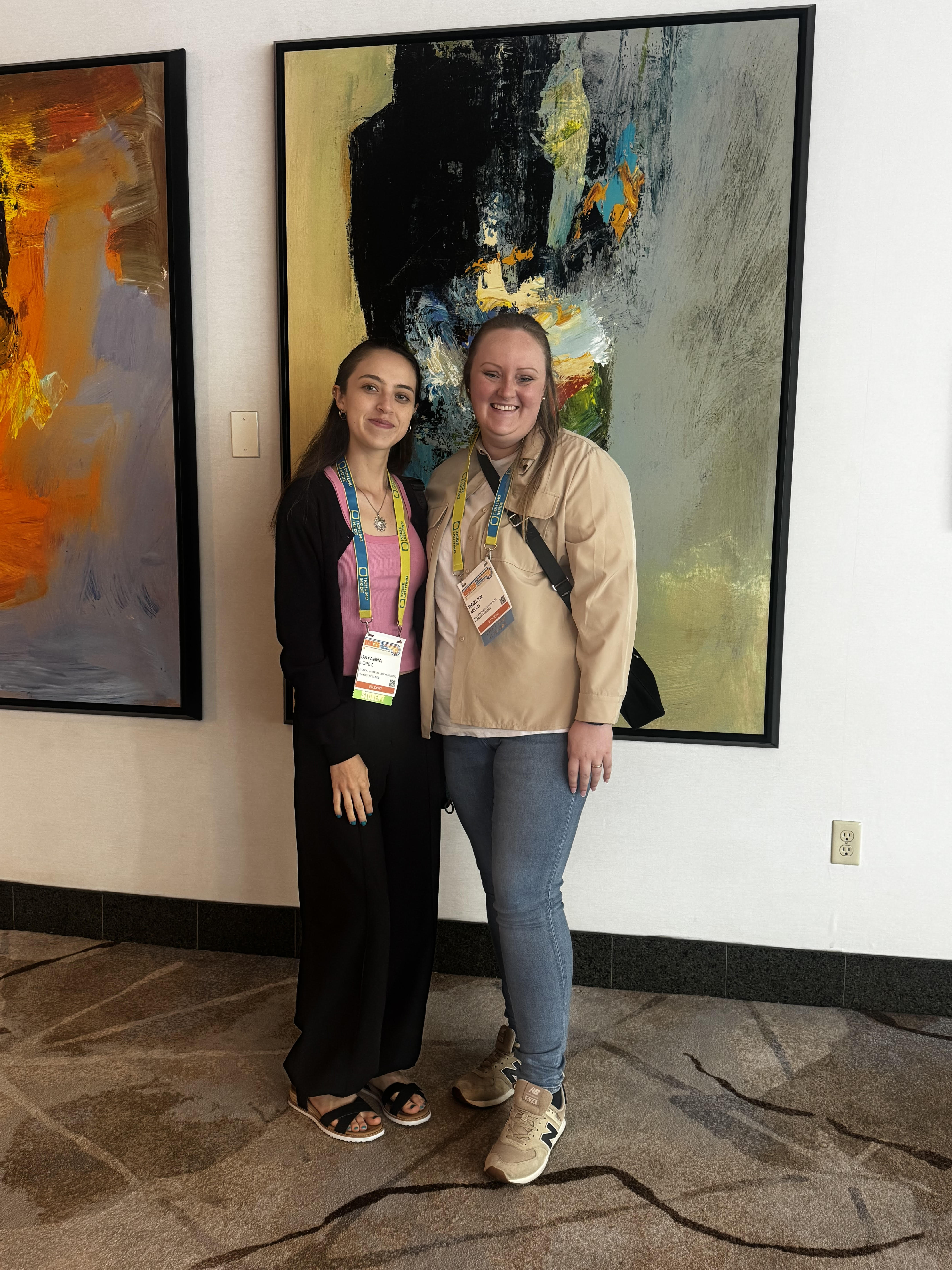
Dayanna and Rozlyn at IES

This August, Architectural Technology student Rozlyn Mead and Interior Design student Dayanna Lopez Buitrago represented Humber Polytechnic at the Illuminating Engineering Society (IES) Annual Conference that took place August 15-17 in Anaheim, California, after being awarded competitive scholarships to attend.

The experience was both inspiring and educational. Highlights included a private tour of the Disney’s Grand Californian Hotel & Spa, featuring presentations from the project’s architect and lighting designers, where students gained first-hand insight into the integration of lighting and design at a world-class destination. The gala also offered valuable networking opportunities with industry professionals, exposure to innovative new lighting products, and the chance to celebrate excellence in the field through the prestigious Illumination Awards ceremony.

This opportunity not only expanded Rozlyn and Dayanna’s professional networks but also deepened their understanding of the evolving role of lighting in architecture and interior design.

When:
December 3, 2024
Posters/Attachments: Event Poster

With the 2024 holiday period fast approaching, please be advised of Financial Services holiday payment processing dates indicated below: Please note that this is not related to payroll dates (employee payments). 

Payment Run Dates for December 2024:

  • Thursday, December 5 – Regular payment schedule
  • Thursday, December 12- Regular payment schedule
  • Tuesday, December 17 12 p.m. - Last day to email invoices to Accounts Payable accounts.payable@humber.ca for invoices to be paid (depending on the payment terms) this calendar year.
  • Thursday, December 19, 2024 - Last payment run of the 2024 calendar year.
  • If you are aware of any vendors that require payment prior to Dec 31 due to their year-end, please ensure invoices are emailed to accounts.payable@humber.ca no later than Dec 17, 2024.

Holiday Period – College Closed December 23, 2024 – January 1, 2025

  • Thursday, January 2, 2025 - First run of the 2025 calendar year, which will lead into the regular weekly Thursday payment run schedule.

If you have any questions, please do not hesitate to contact Staci Lindsay, Manager, Accounts Payable at staci.lindsay@humber.ca   

When:
December 3, 2024

Here are the highlights of faculty questions from November. These are not necessarily the most frequently asked questions, but helpful for all faculty members to know.

Question: How do I create a Test in Blackboard?

Answer:

Follow these step-by-step instructions:

  1. On the Course Content page, select the plus sign > Create. The Create Item panel will open on the right.
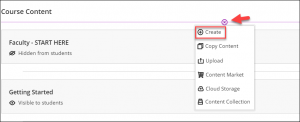
    Plus sign icon that appears between content items in the Course Content area.
  2. On the Create Item panel, scroll down and select Test. The New Test page will open.
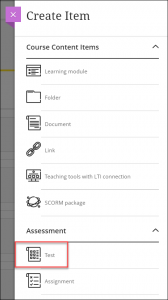
    Test option on Create Item panel, underneath the 'Assessment' heading.
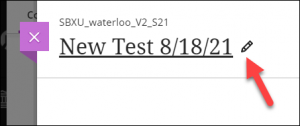
  3. On the New Test page, name your test.
    An arrow pointing to the pencil icon, which you can click to change the name of the test.
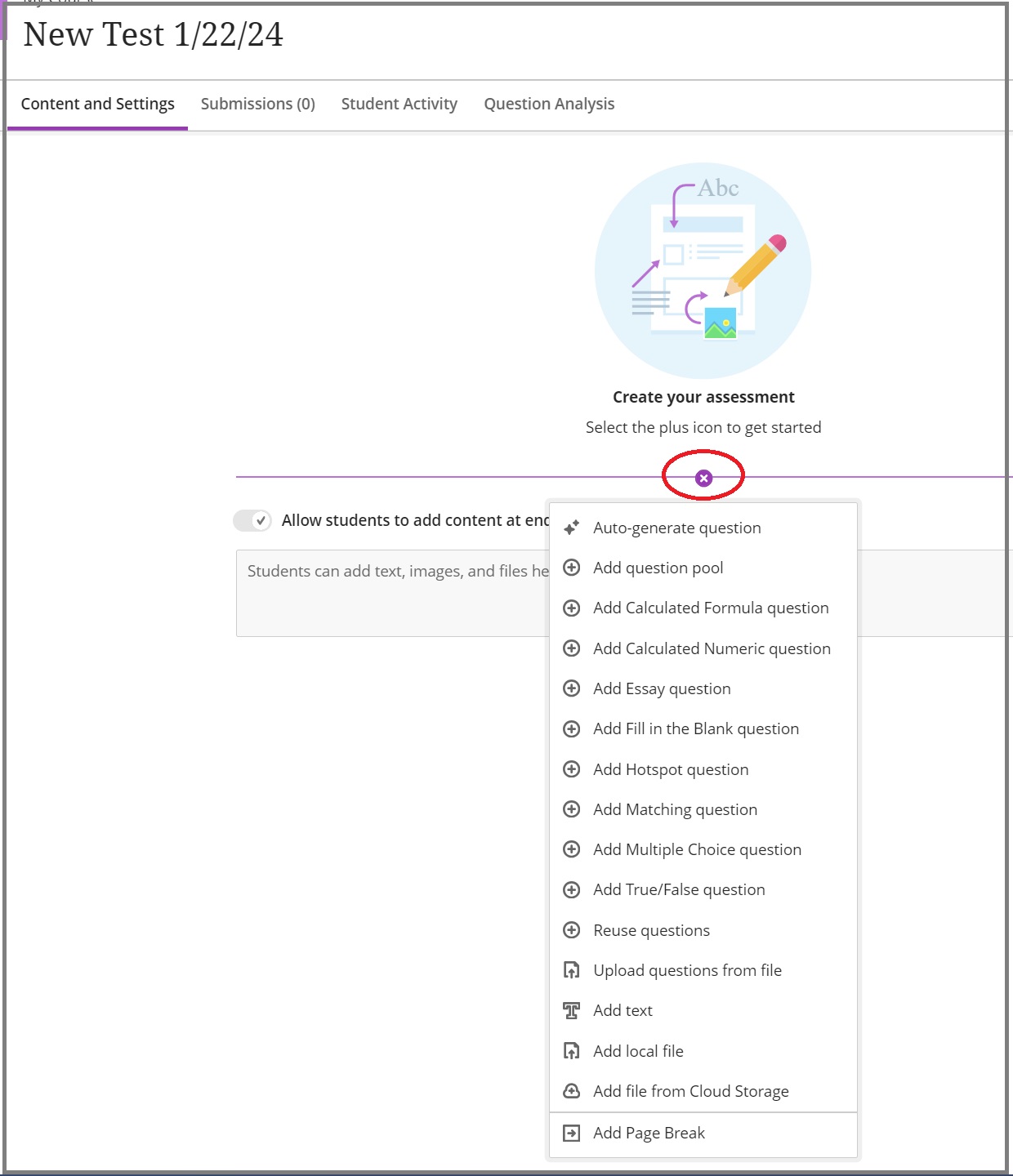
  4. To add a new question, select the plus sign and choose the desired question type.The plus icon on the test screen, where you can create test questions.

Please keep in mind that by default, students can see test questions with their answers, as well as the correct answers, immediately after submission. To change this setting, click the gear icon in “Test Settings”, and go down to “Submission View”. By clicking on this option, you can change the settings related to assessment results viewing to ensure students don’t see the correct answers immediately after submission.

Need support? The Innovative Learning Support Centre is here to help.


Question: I'm having an issue adding the Respondus Lockdown Browser to my test. What can I do?

Answer:

Follow these instructions to learn how to enable and add the Respondus Lockdown Browser to your test.

If you are encountering issues with adding Respondus Lockdown Browser to a test, please make sure that the test name does not include special characters (icons, photos, emoticons, etc.). If it includes any of these characters, the Respondus Lockdown Browser Dashboard will fail to open!

If students are encountering issues accessing the Lockdown Browser, and you copied the test from a previous course, you must go into the new course, access each of the test settings, and select the Respondus LockDown Browser option. This will redirect you to the Respondus settings page; without completing this step, students will not be able to take the exams in the new course, as the Respondus settings do not transfer from one course to the next after copying.

Need support? The Innovative Learning Support Centre is here to help.


Question: How do I grade final assessments using the Gradebook in Blackboard?

Answer:

There are 3 main methods to use the Gradebook for your midterms is:

  • Method 1: Using the overall grade column as your midterm grade. This should only be used when you’ve already created all course assessments. To do this, please complete the following:
    • Set up the Overall Grade as a weighted total.
    • Ensure that you only grade items that contribute to the midterm grade.
    • The grade displayed is the midterm grade. You can enter that grade into Banner. As you continue to grade items throughout the semester, the Overall Grade will update to reflect the students' current grade.
  • Method 2: Creating a manual calculation column within Ultra to calculate midterm grades.
    • Learn how to add a manual grade column.
    • Choose either “Add Calculation” or “Add Total Calculation“. The Total Calculation column mirrors the Overall Grade column, enabling the easy calculation of the lowest/highest grades.
    • Once you name the column, you can set the calculation to add or multiply grades or set a value for the midterm, learn more.
  • Method 3: Downloading a copy of the Gradebook into Excel and calculating the grades from there.

Need support? The Innovative Learning Support Centre is here to help.


Question: How do I drop the lowest grades from a grade category?

Answer:

You can drop the lowest score from a specific category or subset within a category. To achieve this, navigate to the Gradebook, select ‘Overall Grade’ for editing, and then choose the category from which you want to drop the lowest score. Click on ‘Edit calculation rules’.
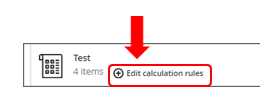
Edit calculation rule from Overall Grade

This opens a side panel that allows you to drop the lowest or highest scores.

The same function is also available if you create a Total Calculation column from the Gradebook.

For more information, please visit the Anthology website.

Need support? The Innovative Learning Support Centre is here to help!

When:
December 3, 2024
Contact:
FMCAD CPL

Are you using AI but not getting the results you're expecting? Learn how to effectively talk to robots in our new cutting-edge micro-credential!

Creating effective prompts directly influences the quality, relevance and accuracy of AI responses and is an essential future-focused skill for professionals in any industry. This micro-credential, taught by AI expert Jason Theodor, focuses on proven, effective prompting techniques with practical augmentation and implementation methods for AI tools. Participants will strategically leverage AI capabilities while maintaining their unique human perspective. 

For more information and to register for next session that starts in January, please visit our website.

Humber family and friends are invited to receive 10 per cent off using discount code ROB10 if they register before January 13, 2025.

When:
December 3, 2024

Hours of operation for Food Services effective December 9, 2024.

Visit dineoncampus.ca for menu and hours of operation.

North Campus December 9 to 12 Friday, December 13  Saturday, December 14 Sunday, December 15
Food Emporium 10 a.m. - 3 p.m. 10 a.m. - 3 p.m Closed Closed
Tim Horton's 7:30 a.m. - 4 p.m. 7:30 a.m. - 4 p.m. Closed Closed
Starbucks LRC Closed Closed. Closed Closed
Starbucks Town Hall 7:30 a.m. - 4 p.m. 7:30 a.m. - 4 p.m Closed Closed
Street Café 7:30 a.m. - 5 p.m.  7:30 a.m. - 4 p.m. Closed Closed
Subway 10 a.m. - 3 p.m. 10 a.m. -  3 p.m. Closed Closed
Booster Juice 9 a.m. - 4 p.m. 9 a.m. - 3 p.m. Closed Closed
Staff Lounge Closed Closed Closed Closed
GH Café 8 a.m. - 2 p.m. (open Monday & Tuesday only) Closed Closed Closed
Trades Café 7:30 a.m. - 3 p.m. 7:30 a.m. - 3 p.m. Closed Closed
Villa Madina Closed Closed Closed Closed
Hawk's Nest Closed Closed Closed Closed
Residence 7:30 a.m. - 11 p.m. 7:30 a.m. - 11 p.m. 9 a.m. - 9 p.m. 9 a.m. - 9 p.m.
The Spot Closed  Closed  Closed Closed
LinX Lounge Closed Closed Closed Closed
Bento Sushi  10 a.m. - 5 p.m. 10 a.m. - 5 p.m. Closed Closed
Ackee Tree/Spiked Patties  10 a.m. - 5 p.m. 10 a.m. - 5 p.m. Closed Closed
Lakeshore Campus Monday to Thursday Friday  Saturday Sunday
Starbucks 8 a.m. - 3 p.m. 8 a.m. - 3 p.m. Closed Closed
Tim Horton's 8 a.m. - 4 p.m. 8 a.m. - 4 p.m. Closed Closed
OTG 8 a.m. - 4 p.m. 8 a.m. - 4 p.m. Closed Closed
L Commons Closed Closed Closed Closed
Residence Cafeteria (4th floor) 7:30 a.m. - 11 p.m. 7:30 a.m. - 11 p.m. 9 a.m. - 9 p.m. 9 am - 9 pm
Cultural Hub Retail Cafeteria (4th floor)  Closed Closed Closed Closed
Cultural Hub Street Café (1st floor) 8 a.m. - 3 p.m. 8 a.m. - 3 p.m. Closed Closed
F Cart Cafe  located in F building)  9 a.m. - 3 p.m.  9 a.m. - 2:30 p.m. Closed Closed
Arena Cafe (Burmingham)  8 a.m. - 2 p.m.  8 a.m. - 2 p.m.  Closed Closed
When:
December 3, 2024
Smiling person

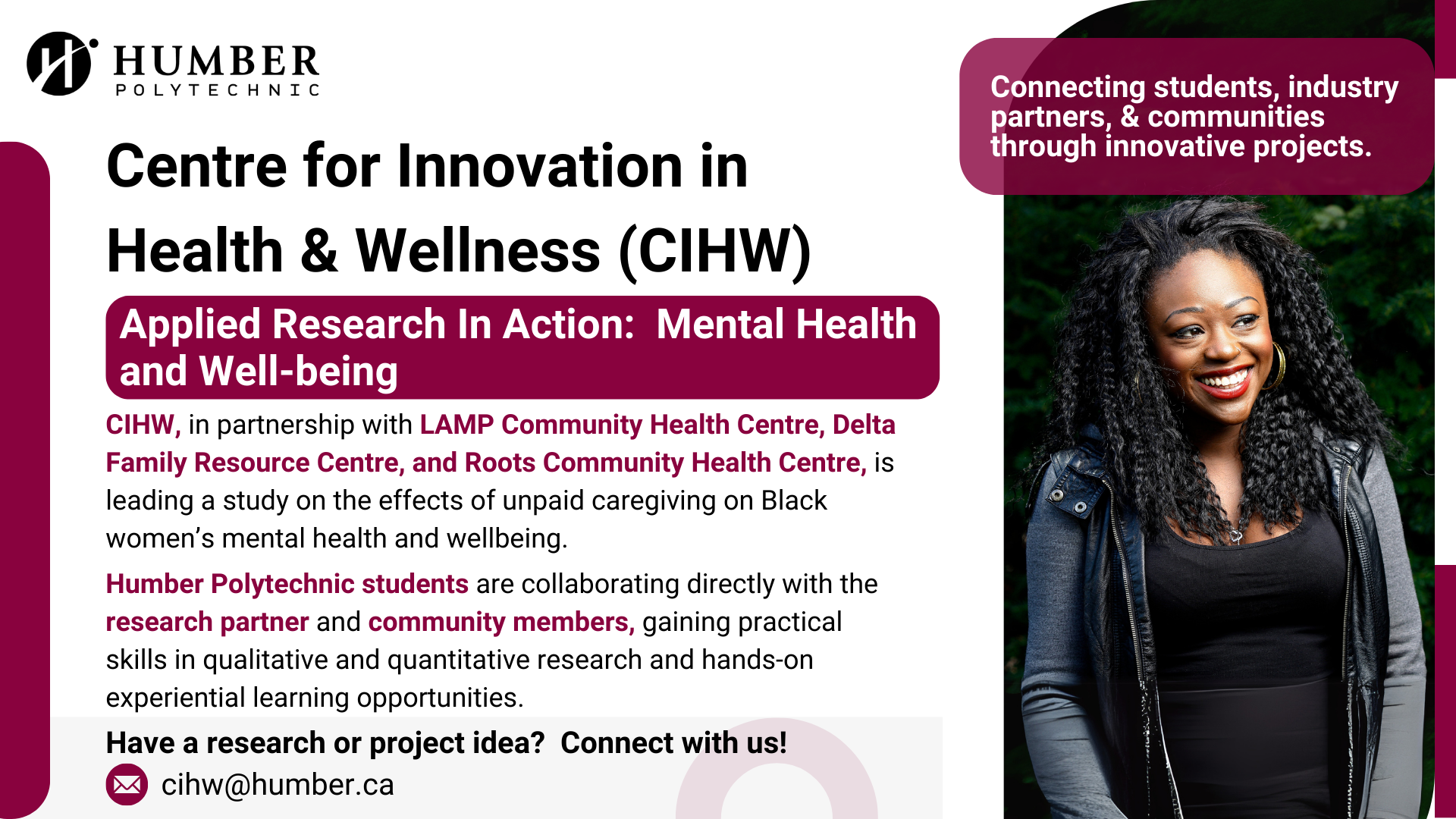
The Centre for Innovation in Health and Wellness (CIHW) is proud to highlight one of our current applied research projects, which focuses on understanding the effects of unpaid caregiving on the mental health and well-being of Black women. 

In Canada, approx. 52 per cent of women provide caregiving to children and/or adults (Statistics Canada, 2022), and over one-third of these caregivers experience mental distress (CIHI).  Black women, as noted in the literature face disproportionate unpaid caregiving burden (McCann et al., 2015) while continuing to balance with paid work responsibilities, often leading to significant physical and mental health well-being challenges (Blue Cross Blue Shield, 2020).   

Our research study aims to listen, understand and share the lived experience and stories of Black women caregivers and learn about the factors that led to those caregiving roles and the impact that it has had on their mental health and well-being. This research will culminate in a comprehensive report with formulation of actionable recommendations and resources to mitigate the mental health impact of unpaid caregiving on Black women in the Greater Toronto Area (GTA).  This report will be a valuable tool for community health and social services organizations working with Black women caregivers or seniors or people living with disabilities. 

Humber Polytechnic students are collaborating directly with our research partner and community members, gaining practical skills in qualitative and quantitative research and hands-on experiential learning opportunities.  

This project highlights the value of community-based applied research, sharing the voices of individuals who need to be heard the most and above all, the power of impactful and hands-on learning experiences for students to be career-ready.

Together, we can create a healthier future for all!

Do you have an innovative idea or know of an industry partner who wants to engage in applied research in health and innovation? Connect and email us at vanita.varma@humber.ca.  

Pages